Lesson Tag: cme4
Step 1: Retailize Your thinking
Retailization is about putting customer experience at the core of all business decisions. In this step, you will identify retail contact points that create the customer experience. You will learn what is category management and how does it contribute to the retailer’s image and business performance?
Evolution of Commercial Function
What is Category Management?
Benefits of category Management
How to Start Category Management
Account does not enabled REST API.
Step 9 Overview
Review Frequency
Category Scorecard
Category Manual
Category Scorecard
Category Manual
Account does not enabled REST API.
Step 8 Overview
Sales Tactics | Part 1
Sales Tactics | Part 2
Margin Tactics
Inventory Turn Tactics
Common Retail Marketing Strategies | Attract & Retain Shoppers
Common Retail Marketing Strategies | Increase Shopper Spend
Common Retail Marketing Strategies. Improve Profitability
Category Roles and Suitable Marketing Strategies
Summary of Step 8
Step 7 Overview
What Is Visual Merchandising?
Why Is Visual Merchandising?
VM Elements and Store Layout
Category Map
Store Fixtures
Steps of Building Planogram | Part 1
Communications
Display Tips
Revenue Sources
Summary of Step 7
Assignment of Step 7: Display Your Products
Sales Tactics | Part 2
Margin Tactics
Inventory Turn Tactics
Common Retail Marketing Strategies | Attract & Retain Shoppers
Common Retail Marketing Strategies | Increase Shopper Spend
Common Retail Marketing Strategies. Improve Profitability
Category Roles and Suitable Marketing Strategies
Summary of Step 8
Step 7 Overview
What Is Visual Merchandising?
Why Is Visual Merchandising?
VM Elements and Store Layout
Category Map
Store Fixtures
Steps of Building Planogram | Part 1
Communications
Display Tips
Revenue Sources
Summary of Step 7
Assignment of Step 7: Display Your Products
Inventory Turn Tactics
Common Retail Marketing Strategies | Attract & Retain Shoppers
Common Retail Marketing Strategies | Increase Shopper Spend
Common Retail Marketing Strategies. Improve Profitability
Category Roles and Suitable Marketing Strategies
Summary of Step 8
Step 7 Overview
What Is Visual Merchandising?
Why Is Visual Merchandising?
VM Elements and Store Layout
Category Map
Store Fixtures
Steps of Building Planogram | Part 1
Communications
Display Tips
Revenue Sources
Summary of Step 7
Assignment of Step 7: Display Your Products
Common Retail Marketing Strategies | Increase Shopper Spend
Common Retail Marketing Strategies. Improve Profitability
Category Roles and Suitable Marketing Strategies
Summary of Step 8
Step 7 Overview
What Is Visual Merchandising?
Why Is Visual Merchandising?
VM Elements and Store Layout
Category Map
Store Fixtures
Steps of Building Planogram | Part 1
Communications
Display Tips
Revenue Sources
Summary of Step 7
Assignment of Step 7: Display Your Products
Category Roles and Suitable Marketing Strategies
Summary of Step 8
Step 7 Overview
What Is Visual Merchandising?
Why Is Visual Merchandising?
VM Elements and Store Layout
Category Map
Store Fixtures
Steps of Building Planogram | Part 1
Communications
Display Tips
Revenue Sources
Summary of Step 7
Assignment of Step 7: Display Your Products
Step 7 Overview
What Is Visual Merchandising?
Why Is Visual Merchandising?
VM Elements and Store Layout
Category Map
Store Fixtures
Steps of Building Planogram | Part 1
Communications
Display Tips
Revenue Sources
Summary of Step 7
Assignment of Step 7: Display Your Products
Why Is Visual Merchandising?
VM Elements and Store Layout
Category Map
Store Fixtures
Steps of Building Planogram | Part 1
Communications
Display Tips
Revenue Sources
Summary of Step 7
Assignment of Step 7: Display Your Products
Category Map
Store Fixtures
Steps of Building Planogram | Part 1
Communications
Display Tips
Revenue Sources
Summary of Step 7
Assignment of Step 7: Display Your Products
Steps of Building Planogram | Part 1
Communications
Display Tips
Revenue Sources
Summary of Step 7
Assignment of Step 7: Display Your Products
Display Tips
Revenue Sources
Summary of Step 7
Assignment of Step 7: Display Your Products
Summary of Step 7
Assignment of Step 7: Display Your Products
Kindly, Download Supported Files
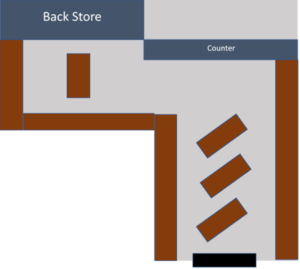
Task 1: On the below lay-out assign space for the weight management category.
Task 2: For the Weight management category kindly start building a planogram taking in your consideration that you have only 10 shelves allocated for your category
Step 6 Overview
What Is Penetration Matrix?
Why Penetration Matrix?
Store Clustering
Practice 1 | Store Clustering
Practice 2 | Store Clustering
Profiling
Practice | Profiling
Minimum Display Quantity
Summary of Step 6
Why Penetration Matrix?
Store Clustering
Practice 1 | Store Clustering
Practice 2 | Store Clustering
Profiling
Practice | Profiling
Minimum Display Quantity
Summary of Step 6
Practice 1 | Store Clustering
Practice 2 | Store Clustering
Profiling
Practice | Profiling
Minimum Display Quantity
Summary of Step 6
Profiling
Practice | Profiling
Minimum Display Quantity
Summary of Step 6
Minimum Display Quantity
Summary of Step 6
Assignment | Step 6
- Your chain just reached to 10 stores and working on profiling one by one become time consuming and needs extra manpower . Kindly start building your penetration matrix to solve this issue.
| Task | Required |
| Task 1 | •Using the previously sent sales report and IMF start building your Matrix for weight management category |
| Task 2 | •Assign MDQ for each Combination |
Step 5 Overview
What is and Why Inventory Planning?
Item Classification
Practice | Item Classification
Steps of Inventory Planning
Practice | Plan Your Inventory
Shelf Availability
Summary of Step 5
Item Classification
Practice | Item Classification
Steps of Inventory Planning
Practice | Plan Your Inventory
Shelf Availability
Summary of Step 5
Steps of Inventory Planning
Practice | Plan Your Inventory
Shelf Availability
Summary of Step 5
Shelf Availability
Summary of Step 5
Step 5 | Assignment
You are invited to a meeting with planning and buying managers to review the purchase plan of the Weight Management Category, your sales Target is 600 K and the owner needs to achieve 4.6 Inventory turn.
- Be ready with your item classification and allocated inventory coverage for each item class.
- Based on the current inventory calculate how much we need to purchase in the coming cycle.
?? Join Live Webinar
Step 3 Overview
Build Item Master File IMF. Item Description
Build Item Master File IMF. Item Categorization
Item Master File Sections
Build Store Master File SMF
Build Vendor Master File VMF
Step 3 Summary
Step 3 | Assignment
Supported Files ” Kindly, Download them”
File 1 | CME, Step 3, Assess, Assignment
File 2 | Item Creation Form
In view of the supported files regarding “Step 2 | Assess Your category”, Kindly upload your submitted assignment via the hereunder assignment section.
Step 2: Assess Your category
Products, customers, competitors, and the market are all important elements of the retail game. In this step, you will learn how to evaluate the performance of your category and business using a set of measures that will help you gain an insightful understating of the business.
Step 4 Overview
What is Assortment
Practice | Define the Assortment
What is Assortment Optimization
Steps of Assortment Optimization | Part 1
Steps of Assortment Optimization | Part 2
Steps of Assortment Optimization | Part 3
Assortment Optimization
Summary of Step 4
Step 4 | Assignment
You have full data about your category WEIGHT MANAGEMENT
Based on the assigned category role and your category strategy start your Assortment Optimization exercise and, Kindly upload your submitted assignment via the hereunder assignment section.